• Home
  • About
  • Contact
  • ado.net
  • angular
  • c#.net
  • design patterns
  • linq
  • mvc
  • .net core
    • .Net Core MVC
    • Blazor Tutorials
  • sql
  • web api
  • dotnet
    • SOLID Principles
    • Entity Framework
    • C#.NET Programs and Algorithms
  • Others
    • C# Interview Questions
    • SQL Server Questions
    • ASP.NET Questions
    • MVC Questions
    • Web API Questions
    • .Net Core Questions
    • Data Structures and Algorithms

Wednesday, July 1, 2020

Route Prefix in Web API

 Admin     July 01, 2020     .Net, Asp.Net, C#, Web API     No comments   

In this article, I am going to discuss the Attribute Routing Route Prefix in Web API with some examples. We are going to work with the same example that we started in Web API Attribute Routing article and continue in Optional Parameters in Web API Attribute Routing article of this Web API article series. At the end of this article, you will understand What is Route Prefix in Web API and when and how to use Web API Route Prefix with an example.

ASP.NET Web API Attribute Routing Route Prefix
Let’s understand the use of Web API Attribute Routing Route Prefix with one example. Let’s modify the StudentController class as shown below.
using System.Collections.Generic;
using System.Linq;
using System.Web.Http;
namespace AttributeRoutingInWEBAPI.Controllers
{
    public class StudentsController : ApiController
    {
        static List<Student> students = new List<Student>()
        {
            new Student() { Id = 1, Name = "Pranaya" },
            new Student() { Id = 2, Name = "Priyanka" },
            new Student() { Id = 3, Name = "Anurag" },
            new Student() { Id = 4, Name = "Sambit" }
        };
        [HttpGet]
        [Route("students")]
        public IEnumerable<Student> GetAllStudents()
        {
            return students;
        }
        [HttpGet]
        [Route("students/{studentID}")]
        public Student GetStudentByID(int studentID)
        {
            Student studentDetails = students.FirstOrDefault(s => s.Id == studentID);
            return studentDetails;
        }
        [HttpGet]
        [Route("students/{studentID}/courses")]
        public IEnumerable<string> GetStudentCourses(int studentID)
        {
            List<string> CourseList = new List<string>();
            if (studentID == 1)
                CourseList = new List<string>() { "ASP.NET", "C#.NET", "SQL Server" };
            else if (studentID == 2)
                CourseList = new List<string>() { "ASP.NET MVC", "C#.NET", "ADO.NET" };
            else if (studentID == 3)
                CourseList = new List<string>() { "ASP.NET WEB API", "C#.NET", "Entity Framework" };
            else
                CourseList = new List<string>() { "Bootstrap", "jQuery", "AngularJs" };
            return CourseList;
        }
    }
}

As you can see from the above example, we are using the route attributes at the action level to define the routes, and furthermore, all the routes in the StudentsController start with the same prefix – students that mean students is the common prefix for all the routes available in the Student Controller.

Here, you can set the common prefix “students” for the entire Student Controller by using the [RoutePrefix] attribute as shown below at the controller level.
using System.Collections.Generic;
using System.Linq;
using System.Web.Http;
namespace AttributeRoutingInWEBAPI.Controllers
{
    [RoutePrefix("students")]
    public class StudentsController : ApiController
    {
        static List<Student> students = new List<Student>()
        {
            new Student() { Id = 1, Name = "Pranaya" },
            new Student() { Id = 2, Name = "Priyanka" },
            new Student() { Id = 3, Name = "Anurag" },
            new Student() { Id = 4, Name = "Sambit" }
        };
        [HttpGet]
        [Route]
        //This will be translated to /students 
        public IEnumerable<Student> GetAllStudents()
        {
            return students;
        }
        [HttpGet]
        [Route("{studentID}")]
        //This will be translated to /students/2
        public Student GetStudentByID(int studentID)
        {
            Student studentDetails = students.FirstOrDefault(s => s.Id == studentID);
            return studentDetails;
        }
        [HttpGet]
        [Route("{studentID}/courses")]
        //This will be translated to /students/2/course
        public IEnumerable<string> GetStudentCourses(int studentID)
        {
            List<string> CourseList = new List<string>();
            if (studentID == 1)
                CourseList = new List<string>() { "ASP.NET", "C#.NET", "SQL Server" };
            else if (studentID == 2)
                CourseList = new List<string>() { "ASP.NET MVC", "C#.NET", "ADO.NET" };
            else if (studentID == 3)
                CourseList = new List<string>() { "ASP.NET WEB API", "C#.NET", "Entity Framework" };
            else
                CourseList = new List<string>() { "Bootstrap", "jQuery", "AngularJs" };
            return CourseList;
        }
    }
}

The Route Prefix attribute eliminates the need to repeat the common prefix “students” on each and every controller action method. However, sometimes we may need to override the route prefix attribute. Let us understand this with an example

First, add a class file with the name “Teacher.cs” within the Models Folder. To do so right-click on the model’s folder, and then add a new class file with the name “Teacher.cs”. Then Copy and paste the following code in it.
namespace AttributeRoutingInWEBAPI.Models
{
    public class Teacher
    {
        public int Id { get; set; }
        public string Name { get; set; }
    }
}

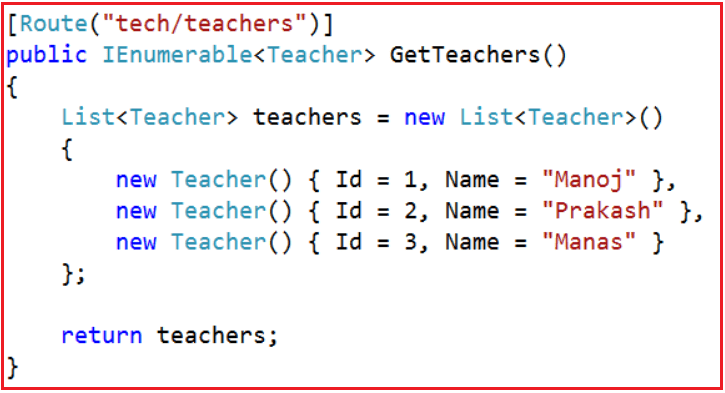
Add the below GetTeachers() action method within the “StudentsController”.
Web API Attribute Routing Route Prefix

After adding the GetTeachers() action in the “StudentsController” class, we want GetTeachers() action to be mapped to the URI “tech/teachers“.
ASP.NET Web API Attribute Routing Route Prefix

If we use the [Route] attribute on GetTeachers() method as shown in the above image and when we navigate to tech/teachers, we get the following error.

Route Prefix in Attribute Routing

But if we navigate to /students/tech/teachers then we get the output as expected that the list of teachers. This is because the [RoutePrefix(“students”)] attribute on StudentsController. Now the question that comes to our mind is how to override the RoutePrefix attribute used in the StudentsController. To override the RoutePrefix we need to use the ~ (tilde) symbol as shown below.
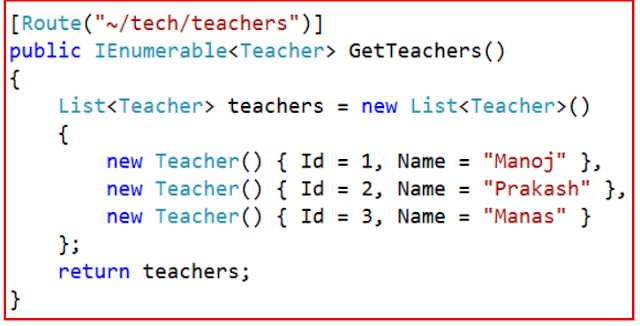
Removing Route Prefix in Attribute Routing

With the above change, now the GetTeachers() action method is mapped to URI “/tech/teachers” as expected.

What is the use of the RoutePrefix attribute?
The RoutePrefix attribute is used to specify the common route prefix at the controller level to eliminate the need to repeat the common route prefix on each and every controller action.

How to override the route prefix?
Use ~ character to override the route prefix

In the next article, I am going to discuss Web API Route Constraint in Attribute Routing. Here, In this article, I try to explain the Web API Route Prefix with some examples. I hope you enjoy this article.

Summary:
I Hope this post will be helpful to understand the concept of Route Prefix in Web API
Please share this post with your friends and colleagues.
For any queries please post a comment below.
Happy Coding 😉
Read More
  • Share This:  
  •  Facebook
  •  Twitter
  •  Google+
  •  Stumble
  •  Digg

Optional Parameters in Web API Attribute Routing

 Admin     July 01, 2020     .Net, Asp.Net, C#, Web API     No comments   

In this article, I am going to discuss Optional Parameters in Web API Attribute Routing with some examples. Please read our previous article before proceeding to this article as we are going to work with the same example that we started in the Web API Attribute Routing article where we discussed the following things.
  1. Why we need attribute routing?
  2. What is Attribute Routing?
  3. How to Implement Attribute Routing?
  4. What are the advantages of using Attribute Routing?
Optional Parameters in Web API Attribute Routing and Default Values:
You can make a URI parameter as optional by adding a question mark (“?”) to the route parameter. If you make a route parameter as optional then you must specify a default value by using parameter = value for the method parameter.

We are going to work with the same example that we created in our last article. In our last article, we use the following Student Model

Along with we modify the WebApiConfig class as shown below.

Let’s modify the Student Controller as shown below.
namespace AttributeRoutingInWEBAPI.Controllers
{
    public class StudentsController : ApiController
    {
        static List<Student> students = new List<Student>()
        {
            new Student() { Id = 1, Name = "Pranaya" },
            new Student() { Id = 2, Name = "Priyanka" },
            new Student() { Id = 3, Name = "Anurag" },
            new Student() { Id = 4, Name = "Sambit" }
        };
        
        // Optional URI Parameter with default value
        // URL: /api/students
        // URL: /api/students/1
        [Route("api/students/{stdid:int?}")]
        public Student GetBooksByID(int stdid = 1)
        {
            return students.FirstOrDefault(s => s.Id == stdid);
        }
    }
}
In the above example, /api/students and /api/students/1 return the same resource. Alternatively, you can also specify a default value inside the route template as shown in the below image.

This is almost the same as the previous example, but there is a slight difference in the behavior when the default value is applied.

In the first example (“{stdid?}”), here the default value 1 is directly assigned to the action method parameter, so the method parameter will have this value exactly.

In the second example (“{stdid=1}”), the default value “1” assigned to the method parameter through the model-binding process. The default model-binder in Web API will convert the value “1” to the numeric value 1.

In most of the cases, unless you have custom model binders in your pipeline, the two forms will be equivalent.

In the next article, I am going to discuss Route Prefix in Web API Attribute Routing. Here, in this article, I try to explain the Optional Parameters in Web API Attribute Routing step by step with some examples. I hope this Optional parameter in the Web API Attribute Routing article will help you with your need. I would like to have your feedback. Please post your feedback, question, or comments about this article.

Summary:
I Hope this post will be helpful to understand the concept of Optional Parameters in Web API Attribute Routing
Please share this post with your friends and colleagues.
For any queries please post a comment below.
Happy Coding 😉
Read More
  • Share This:  
  •  Facebook
  •  Twitter
  •  Google+
  •  Stumble
  •  Digg

Wednesday, May 13, 2020

ASP.NET Web API Attribute Routing

 Admin     May 13, 2020     .Net, Web API     No comments   

In this article, I am going to discuss Web API Attribute Routing with some examples. As we already discussed in the ASP.NET Web API Routing article that the Routing is a pattern matching mechanism to match an incoming HTTP Request to an action method of a controller.

The ASP.NET Web API 2 and ASP.NET MVC 5 supports a new type of routing called attribute routing. As the name implies, attribute routing means attributes are used to define routes. The Attribute routing provides more control over the URIs in your Web API application by defining routes directly on the actions and controllers. For example, you can easily create URIs that describes the hierarchies of resources.

The earlier style of routing called convention-based routing is still fully supported by Web API. In fact, you can combine both approaches in the same project.

In this article, we will discuss how to enable attribute routing in Web API and describes the various options for attribute routing.

Why do we need Web API Attribute Routing?

The first release of Web API uses the convention-based routing. In convention-based, we can define one or more route templates in the WebApiConfig file, which are basically parameterized strings. When the Web API Framework receives an HTTP request, it matches the URI against the route template that is available in the Route Table. For more information about convention-based routing, Please read the following articles where we discussed the Convention based Routing in Web API with examples.

One advantage of convention-based routing is that all the URI templates are defined in a single place, and the routing rules are applied consistently across all the controllers.

But the convention-based routing in Web API makes it hard to support certain URI patterns that are common in RESTful APIs. For example, resources often contain child resources: Customers have orders, movies have actors, books have authors, etc. It’s natural to create URIs that reflects these relations:

Let’s understand this with an example.
Step1: Create a new Web API application. Name it AttributeRoutingInWEBAPI

Step2: Right-click on the “Models” folder and add a class file with the name Student.cs and then copy and paste the following code.
namespace AttributeRoutingInWEBAPI.Models
{
    public class Student
    {
        public int Id { get; set; }
        public string Name { get; set; }
    }
}
Step3: Now, add Students Controller.
To do so Right-click on the Controllers folder and add a new Web API2 controller – Empty. Name it StudentsController.cs. Copy and paste the following code.
namespace AttributeRoutingInWEBAPI.Controllers
{
    public class StudentsController : ApiController
    {
        static List<Student> students = new List<Student>()
        {
            new Student() { Id = 1, Name = "Pranaya" },
            new Student() { Id = 2, Name = "Priyanka" },
            new Student() { Id = 3, Name = "Anurag" },
            new Student() { Id = 4, Name = "Sambit" }
        };
        public IEnumerable<Student> Get()
        {
            return students;
        }
        public Student Get(int id)
        {
            return students.FirstOrDefault(s => s.Id == id);
        }
        public IEnumerable<string> GetStudentCourses(int id)
        {
            List<string> CourseList = new List<string>();
            if (id == 1)
                CourseList = new List<string>() { "ASP.NET", "C#.NET", "SQL Server" };
            else if (id == 2)
                CourseList = new List<string>() { "ASP.NET MVC", "C#.NET", "ADO.NET" };
            else if (id == 3)
                CourseList = new List<string>() { "ASP.NET WEB API", "C#.NET", "Entity Framework" };
            else
                CourseList = new List<string>() { "Bootstrap", "jQuery", "AngularJs" };
            return CourseList;
        }
    }
}
In Web API1, we had the convention-based routing that defines the routes using the route templates. When we create a new Web API project the Web API Framework creates a default route in the WebApiConfig.cs file. The default route is shown below
Attribute Routing in WEB API

So with the above default route and the StudentsController in place /api/students is mapped to the Get() method of StudentsController as expected as shown in the below image.
Attribute Routing in WEB API

But when we navigate to /api/students/1 we get the following exception message

Multiple actions were found that match the request: Get on type AttributeRoutingInWEBAPI.Controllers.StudentsController GetStudentCourses on type AttributeRoutingInWEBAPI.Controllers.StudentsController

This is because the Web API Framework does not know which of the 2 following action methods to map to the URI /api/students/1

Get(int id) GetStudentCourses(int id)

This can be very easily achieved by using the Attribute Routing. Here is what we want the WEB API Framework to do
  • URI /api/students/1 should be mapped to Get(int id). This method should return the student by id.
  • The URI /api/students/1/courses should be mapped to GetStudentCourses(int id). This method should return the student courses by student id.
To achieve the above, we need to decorate the GetStudentCourses() action method with the [Route] attribute as shown in the below image
Attribute Routing in WEB API

At this point build the solution and navigate to /api/students/1. Notice that, now you will get the student details whose id=1 and when you navigate to /api/students/1/courses you will get all the courses into which student with id=1 is enrolled.

Let us see some of the examples where attribute routing makes it easy.

API versioning
In the below example, the route “/api/v1/students” would be routed to a different controller than the “/api/v2/students” route.

/api/v1/students

/api/v2/students

Overloaded URI segments
In this example, “1” is an order number, but “pending” maps to a collection.

/orders/1

/orders/pending

Multiple parameter types
In this example, “1” is an order number, but “2013/06/16” specifies a date.

/orders/1

/orders/2013/06/16

How to enable Web API Attribute Routing?
In Web API 2, the Attribute Routing is enabled by default. The config.MapHttpAttributeRoutes(); code which is present in WebApiConfig.cs file enables the Web API Attribute Routing.

We can also combine the Web API Attribute Routing with convention-based routing. To define convention-based routes, call the MapHttpRoute method as shown below.
Attribute Routing in WEB API

Can we use both Attribute Routing and Convention-based routing in a single Web API project?
Yes, We can combine both the routing mechanisms in a single ASP.NET Web API project. The controller action methods that have the [Route] attribute uses the Attribute Routing and the others without [Route] attribute uses Convention-based routing.

Note: You need to configure the Attribute routing before the convention-based routing in ASP.NET Web API.

What are the advantages of using Web API Attribute Routing?
  • It gives us more control over the URIs than convention-based routing. Creating URI patterns like hierarchies of resources (For example, students have courses, Departments have employees) is very difficult with convention-based routing.
  • Reduces the chances for errors, if a route is modified incorrectly in RouteConfig.cs then it may affect the entire application’s routing.
  • May decouple controller and action names from route entirely.
  • Easy to map two routes pointing to the same action.
In the next article, we will discuss Optional Parameters in Web API Attribute Routing with examples. Here, in this article, I try to explain the Web API Attribute Routing step by step with some examples. I hope this Web API Attribute Routing article will help you with your needs. I would like to have your feedback. Please post your feedback, question, or comments about this article.

Summary:
I Hope this post will be helpful to understand the concept of Attribute routing in Web API
Please share this post with your friends and colleagues.
For any queries please post a comment below.
Happy Coding 😉
Read More
  • Share This:  
  •  Facebook
  •  Twitter
  •  Google+
  •  Stumble
  •  Digg

Saturday, April 25, 2020

Routing and Action Selection in Web API

 Admin     April 25, 2020     .Net, Web API     No comments   

In this article, I am going to discuss Routing and Action Selection in Web API i.e. how the ASP.NET Web API Framework routes or transfer an incoming HTTP request to a particular action method of a controller. Please read Routing in WEB API and ASP.NET WEB API Routing Variations articles before proceeding to this article where we discussed the High-Level Overview of Routing in ASP.NET WEB API.

The Routing module has three main phases:
  • Matching the URI to a route template.
  • Selecting a controller.
  • Selecting an action.
Route Templates
A route template in WEB API looks very much similar to a URI path, but it can have placeholder values that are indicated with curly braces as shown in the below image.
Routing and Action Selection in Web API

When we create a route, it is also possible to provide default values for some or all of the placeholders as shown in the below image.
Routing and Action Selection in Web API

We can also provide some constraints which will restrict how a URI segment can match a placeholder as shown below.
Routing and Action Selection in Web API

The WEB API Framework tries to match the segments in the URI path with the route template present in the Route table. The Literals in the template must match exactly. A placeholder matches any value unless we specify some constraints. The WEB API framework does not match other parts of the URI such as the hostname or the query parameters. The framework always selects the first route in the routing table that matches the URI.

There are two special placeholders used in WEB API such as “{controller}” and “{action}”.
  • The “{controller}” placeholder provides the name of the controller.
  • Similarly, the “{action}” placeholder provides the name of the action. In Web API, the usual convention is to omit the “{action}” placeholder. That’s why when you create a new WEB API application, and then you can see that the default route template created by the framework does not include the action placeholder.
Defaults
If you provide a default value for a placeholder, then the route will match a URI that is missing those segments. For example:
Routing and Action Selection in Web API

The URI “http://localhost/api/student/public” matches this route. The “{category}” segment is assigned the default value “all”.

Route Dictionary
When the WEB API Framework finds a match for a URI, then it creates a dictionary that will contain the value for each placeholder. As we know the dictionary contains the data in the form of a key-value pair. Here, the keys are nothing but the placeholder names but excluding the curly braces and the values are taken from the URI path or from the defaults. The dictionary is stored in the IHttpRouteData object as shown below.
Routing and Action Selection in Web API

During the route-matching phase, the special placeholders such as “{controller}” and “{action}” are treated just like any other placeholders. They are simply stored in the dictionary with the other values.

A default can have a special value RouteParameter.Optional. If a placeholder assigned with this value, then the value will not be added to the route dictionary. For example:
Routing and Action Selection in Web API

For the URI path “api/student/public“, the route dictionary will contain two elements such as:
  1. controller: “student”
  2. category: “all”
For the URI path “api/student/public/cse/101“, the route dictionary will contain three elements such as:
  1. controller: “student”
  2. category: “cse”
  3. id: “101”
The defaults can also include a value that does not appear anywhere in the route template. If the route matches, that value is also get stored in the dictionary. For example:
Routing and Action Selection in Web API

If the URI path is “api/root/101“, then the dictionary will contain two elements such as:
  1. controller: “Employee”
  2. id: “101”
Selecting a Controller
The Controller selection in WEB API is handled by the IHttpControllerSelector.SelectController method.
Routing and Action Selection in Web API

As shown in the above image the SelectController method takes an HttpRequestMessage instance as a parameter and returns an HttpControllerDescriptor. The default implementation for the above SelectController method is provided by the DefaultHttpControllerSelector class as shown in the below image.
Routing and Action Selection in Web API

The above class uses a straightforward algorithm to find the controller as:
  • First, it will look at the route dictionary collection for the key “controller”.
  • Secondly, it takes the value for the “controller” key and appends the string “Controller” to get the controller type name.
  • Finally, it looks for a Web API controller with this type of name.
For example, if the route dictionary contains the key-value pair “controller” = “Student”, then the controller type is “StudentController”. If there is no matching type found, or it found multiple matches, then the ASP.NET WEB API Framework simply returns an error to the client.

Action Selection
After selecting the controller, next, the WEB API Framework selects the action by calling the IHttpActionSelector.SelectAction method. This method takes an HttpControllerContext as a parameter and returns an HttpActionDescriptor as shown in the below image.
Routing and Action Selection in Web API

The default implementation for the SelectAction is provided by the ApiControllerActionSelector class as shown in the below image.
Routing and Action Selection in Web API

To select an action, it looks at the following algorithm:
  • The HTTP method of the request.
  • The “{action}” placeholder in the route template, if present.
  • The parameters of the actions on the controller.
Before looking at the selection algorithm, first, we need to understand which methods on the controller class are considered as “actions” methods?

When selecting an action, the WEB API Framework only looks at the public methods of the controller excluding the constructors, events, operator overloads, and so forth, and methods that are inherited from the ApiController class.

HTTP Methods:
The WEB API Framework only chooses the action methods that match the HTTP method of the incoming request, determined as follows:
  • The actions which are decorated with the HTTP attribute such AcceptVerbs, HttpDelete, HttpGet, HttpHead, HttpOptions, HttpPatch, HttpPost, or HttpPut.
  • If the method names of the controller starts with “Get”, “Post”, “Put”, “Delete”, “Head”, “Options”, or “Patch”, then by convention the action supports that HTTP method.
Parameter Bindings:
The parameter binding is how Web API creates value for a parameter. Here is the default rule for parameter binding:
  • Simple types are taken from the URI.
  • Complex types are taken from the request body.
It is also possible to change the default parameter binding in WEB API.

With that background, let see the action selection algorithm.
  • Create a list of all the actions on the controller that match the HTTP request method.
  • If the route dictionary has an “action” entry, remove actions whose name does not match this value.
  • Try to match action parameters to the URI, as follows:
  • For each action, get a list of the parameters that are the simple type, where the binding gets the parameter from the URI. Exclude optional parameters.
  • From this list, try to find a match for each parameter name, either in the route dictionary or in the URI query string. Matches are case insensitive and do not depend on the parameter order.
  • Select an action where every parameter in the list has a match in the URI.
  • If more than one action meets these criteria, pick the one with the most parameter matches.
  • Ignore actions with the [NonAction] attribute.
Step3 is probably the most confusing step. The basic idea is that a parameter can get its value either from the URI or from the request body, or from a custom binding. For parameters that come from the URI, we want to ensure that the URI actually contains a value for that parameter, either in the path (via the route dictionary) or in the query string.

Example:
Let us consider the above points with an example.

Routes:
Routing and Action Selection in Web API

Controller:
Routing and Action Selection in Web API

HTTP request:

GET http://localhost:50470/api/student/1?version=2.1&details=1

Route Matching
The above URI matches the route named “DefaultApi”. The route dictionary contains the following elements:
  • controller: “Student”
  • id: “1”
The route dictionary does not contain the query string parameters, “version” and “details”, but these will still be considered during action selection.

Controller Selection
From the “controller” entry in the route dictionary, the WEB API Framework select the controller type is StudentController.

Action Selection
The above HTTP request is a GET request. The controller actions that support GET Request are GetAllStudents, GetStudentById, and FindStudentsByName. The route dictionary does not contain an entry for “action”, so we don’t need to match the action name.

Next, we need to match the parameter names for the actions, looking only at the GET actions.
Routing and Action Selection in Web API

Notice that the version parameter of GetStudentById is not considered, because it is an optional parameter.

The GetAllStudents method matches trivially. The GetStudentById method also matches, because the route dictionary contains the “id”. The FindStudentsByName method does not match.

The GetStudentById method wins because it matches one parameter, versus no parameters for GetAllStudents. The method is invoked with the following parameter values:
  • id = 1
  • version = 2.1
Notice that even though the version was not used in the selection algorithm, the value of the parameter comes from the URI query string.

Summary:
I Hope this post will be helpful to understand the concept of Routing and Action Selection in Web API
Please share this post with your friends and colleagues.
For any queries please post a comment below.
Happy Coding 😉
Read More
  • Share This:  
  •  Facebook
  •  Twitter
  •  Google+
  •  Stumble
  •  Digg

Friday, April 24, 2020

Routing Variations in WEB API

 Admin     April 24, 2020     .Net, Web API     No comments   

In this article, I am going to discuss Routing Variations in WEB API with some examples. Please read our previous article before proceeding to this article where we discussed the basics of Routing in WEB API.

Understanding HTTP Verbs in Web API.
In the last article, we discussed using the default naming convention provided by Web API Framework. Instead of using the default naming convention for the HTTP methods, you can also explicitly specify the HTTP method for action by decorating the action method with the HttpGet, HttpPut, HttpPost, or HttpDelete attribute.

Let us understand with an example.

Please consider the following controller.
Understanding HTTP Verbs in Web API

In the above example, the FindAllStudents and FindStudentById actions are mapped to the GET request, while the RemoveStudent action is mapped to DELETE Request and the AddStudent action is mapped to POST Request. If you want to allow multiple HTTP verbs a single action method, or if you to allow HTTP methods other than the GET, PUT, POST, and DELETE, then you need to use the AcceptVerbs attribute, which takes a list of HTTP methods as shown in the below image
Understanding AcceptVerbs in ASP.NET Web API

In the above example, the FindStudentById action method is mapped to both GET and HEAD HTTP Request.

Routing Variation in Web API by Action Name
With the default routing template, the Web API Framework uses the HTTP method to select the action. However, if you want you can also create your own route where the action name is included as part of the URI as shown in the below image.
Routing Variations in WEB API

In the above route template, the {action} parameter names the action method on the controller. With this style of routing, you need to use the attributes to specify the allowed HTTP methods.

Let us understand this with an example. Please consider the following controller.
Routing Variations in WEB API

In the above example, a GET request for “api/Student/FindAllStudents” would map to the FindAllStudents action method.

In ASP.NET Web API by using the ActionName attribute you can also override the action method name. In the below Student Controller class, we have two actions which map to “api/Student/Image“. One action method supports the GET request while the other one supports the POST HTTP request.
ActionName Attribute in ASP.NET Web API Application

Understanding the NonAction Attribute in ASP.NET Web API:
If you want to prevent an action method from getting invoked as a response to an HTTP request, then you need to decorate that action with the NonAction attribute. This tells the Web API Framework that the method is not an action, even if it would match the routing rules.
Understanding the NonAction Attribute in ASP.NET Web API

As of now, we have discussed a high-level overview of ASP.NET Web API Routing. In the next article, I am going to discuss how the WEB API Framework matches a URI to a route, selects a controller, and then selects the action to invoke. Here, in this article, I try to explain Routing Variations in WEB API step by step with some examples. I hope this Routing Variation in WEB API article will help you with your need.

Summary:
I Hope this post will be helpful to understand Routing Variations in WEB API
Please share this post with your friends and colleagues.
For any queries please post a comment below.
Happy Coding 😉
Read More
  • Share This:  
  •  Facebook
  •  Twitter
  •  Google+
  •  Stumble
  •  Digg

ASP.NET Web API Routing

 Admin     April 24, 2020     .Net, Web API     No comments   

In this article, I am going to discuss ASP.NET Web API Routing with examples. Please read our previous article where we discussed Cross-Origin Resource Sharing in Web API with examples. The Routing in Web API is one of the most important concepts that you need to understand. Once you understand this concept, then you can easily learn the internal architecture of the ASP.NET Web API pipeline.

What is Routing in Web API?
The Web API Routing module is responsible for mapping the incoming HTTP requests to a particular controller action method. If you are familiar with the ASP.NET MVC application, then you can easily understand the Routing as it is very much similar to MVC routing.

The major difference between these two routing mechanisms is that the Web API uses the HTTP method, not the URI path, to select the action. You can also use MVC style routing in Web API which we will discuss in our upcoming articles.

Understanding the Routing Table in ASP.NET Web API:
In Web API application, a controller is a class that contains action methods that actually handle the incoming HTTP requests. The public methods of the controller class are called action methods or simply actions. When the Web API Framework receives an HTTP request, it routes that HTTP request to an action method of a controller.

To determine which action method to select or invoke for a particular HTTP Request, the WEB API Framework uses a Routing table. When we create a WEB API application, by default, the Visual Studio creates a default route for our application as shown in the below image.
Routing in ASP.NET Web API

The above route is defined in the WebApiConfig.cs file, which is present inside the App_Start folder.

The routing table in Web API contains each and every route template that we define in the WebApiConfig file. The default route template for the Web API application is “api/{controller}/{id}“. In this template, the term “api” is a literal path segment, and the {controller} and {id} are placeholder variables that will be replaced with the actual value.

How the Web API Framework handle an incoming HTTP Request?
When the ASP.NET Web API Framework receives an HTTP request, it tries to match the URI against one of the route templates available in the routing table. If no route template matches the URI, then Web API Framework returns a 404 error to the client who actually makes the request. For example, the following URIs match with the default route template

  • /api/student
  • /api/students/1
  • /api/products/prd1
However, the following URI does not match, because it lacks the “api” segment:

/products/1

Note: The reason for using “api” in the route is to avoid collisions between the Web API and MVC routing. So, you can have “/products” go to the MVC controller, and “/api/products” go to the Web API controller. Of course, if you don’t like this convention, you can change the default route table that also we will discuss.

Once a matching route is found in the Route table. The Web API Framework then selects the controller and the action. To find the controller, the Web API Framework adds “Controller” to the value of the {controller} variable. To find the action, the Web API Framework looks at the HTTP method and then looks for an action method whose name begins with that HTTP method name.

For example, with a GET request, the Web API Framework looks for an action that should start with “Get“, such as “GetProduct” or “GetAllProducts”. This convention only applies to GET, POST, PUT, and DELETE methods. You can enable other HTTP methods by using attributes on your controller that we will discuss in our upcoming article.

Other placeholder variables in the route template, such as {id}, are mapped to action method parameters.

Let us see an example for a better understanding. Suppose you define the following Student controller
Routing in Web API

Here are some possible HTTP requests, along with the action that gets invoked for each request.
ASP.NET Web API Routing

Notice that the {id} segment of the URI, if present, is mapped to the id parameter of the action. In our example, the Student controller defines two GET methods, one with an id parameter and one with no parameters. It also defines one PUT method which takes one parameter of student type from the request body.

Here another point you need to understand is that the POST request will fail as the controller does not have any “Post” method.

Summary:
I Hope this post will be helpful to understand the concept of routing in Web API
Please share this post with your friends and colleagues.
For any queries please post a comment below.
Happy Coding 😉
Read More
  • Share This:  
  •  Facebook
  •  Twitter
  •  Google+
  •  Stumble
  •  Digg

Thursday, April 23, 2020

Cross-Origin Resource Sharing in WEB API

 Admin     April 23, 2020     .Net, Web API     No comments   

In this article, I am going to discuss how to enable Cross-Origin Resource Sharing in Web API which allows cross-domain AJAX calls. Please read our previous article before proceeding to this article as we are going to work with the same example. In our previous article, we discussed How to Call a Web API Service in a Cross-Domain Using jQuery AJAX with an example. The CORS support is released with ASP.NET Web API 2.

What are the same-origin policy and default behavior of browsers in AJAX Requests?
Browsers allow a web page to make AJAX requests only within the same domain. Browser security policy prevents a web page from making AJAX requests to another domain. This is called the same-origin policy. In other words, it is a known fact that browser security prevents a web page of one domain from executing AJAX calls on another domain.

What is CORS?
CORS is a W3C standard that allows you to get away from the same-origin policy adopted by the browsers to restrict access from one domain to resources belonging to another domain. You can enable CORS for your Web API using the respective Web API package (depending on the version of Web API in use).

Changes to Web API project:
Delete the following 2 lines of code in the Register() method of WebApiConfig class in WebApiConfig.cs file in the App_Start folder. We added these lines in our previous articles to make ASP.NET Web API Service return JSONP formatted data
var jsonpFormatter = new JsonpMediaTypeFormatter(config.Formatters.JsonFormatter);
config.Formatters.Insert(0, jsonpFormatter);

Your WebApiConfig class should look as shown below.
Cross-Origin Resource Sharing in Web API

How to enable CORS in Web API?
Step1: Install Microsoft.AspNet.WebApi.Cors package. Execute the following command using the NuGet Package Manager Console. Step2: Include the following 2 lines of code in Register() method of WebApiConfig class in WebApiConfig.cs file in App_Start folder
EnableCorsAttribute cors = new EnableCorsAttribute(“*”, “*”, “*”);
config.EnableCors();

After adding the above two lines of code, the WebApiConfig class should as shown below.
public static class WebApiConfig
{
    public static void Register(HttpConfiguration config)
    {
        // Web API routes
        config.MapHttpAttributeRoutes();
        config.Routes.MapHttpRoute(
            name: "DefaultApi",
            routeTemplate: "api/{controller}/{action}/{id}",
            defaults: new { id = RouteParameter.Optional }
        );
        EnableCorsAttribute cors = new EnableCorsAttribute("*", "*", "*");
        config.EnableCors();
    }
}

The following 2 lines of code in Register() method of WebApiConfig.cs file in App_Start folder enables CORS globally for the entire application i.e. for all controllers and action methods
EnableCorsAttribute cors = new EnableCorsAttribute(“*”, “*”, “*”);
config.EnableCors();

Step3: In the Client Application, set the dataType option of the jQuery ajax function to JSON dataType: ‘json’

Now run the service first and then the client application and check everything is working as expected.

Parameters of EnableCorsAttribute
Origins: A comma-separated list of origins that are allowed to access the resource. For example “https://csharptechtics.blogspot.com, https://www.something.com” will only allow ajax calls from these 2 websites. All the others will be blocked. Use “*” to allow all

Headers: A comma-separated list of headers that are supported by the resource. For example “accept,content-type, origin” will only allow these 3 headers. Use “*” to allow all. Use the null or empty string to allow none

Methods: A comma-separated list of methods that are supported by the resource. For example “GET, POST” only allows Get and Post and blocks the rest of the methods. Use “*” to allow all. Use a null or empty string to allow none

How to use EnableCors attribute at the Controller and action method level?
It is also possible to apply the EnableCors attribute either at the controller level or at the action method level. If applied at a controller level then it is applicable for all methods in that controller. Call the EnableCors() method without any parameter values.

Apply the EnableCorsAttribute on the controller class
[EnableCorsAttribute("*", "*", "*")]
public class EmployeesController : ApiController
{
}

In the same manner, we can also apply it at a method level if we wish to do so.
public class EmployeeController : ApiController
{
    [HttpGet]
    [EnableCorsAttribute("*", "*", "*")]
    public IEnumerable<employee> GetEmployees()
    {
        EmployeeDBContext dbContext = new EmployeeDBContext();
        return dbContext.Employees.ToList();
    }
}

To disable CORS for a specific action apply [DisableCors] on that specific action.

Summary:
I Hope this post will be helpful to understand the concept of Cross-Origin Resource Sharing (CORS) in WEB API
Please share this post with your friends and colleagues.
For any queries please post a comment below.
Happy Coding 😉
Read More
  • Share This:  
  •  Facebook
  •  Twitter
  •  Google+
  •  Stumble
  •  Digg
Newer Posts Older Posts

Join us on Telegram

Loved Our Blog Posts? Subscribe To Get Updates Directly To Your Inbox

Like us on Facebook

Popular Posts

  • Angular Interpolation
    In this article, I am going to discuss the Angular Interpolation with Examples. Please read our previous article before proceeding to this...
  • Recursion And Back Tracking
    In this article, I am going to discuss Recursion And BackTracking in detail. Please read our previous article where we discussed Master Th...
  • Navigation Menus in ASP.NET Core
    In this article, I am going to discuss how to create Responsive Navigation Menus in ASP.NET Core Application using bootstrap and JQuery. P...
  • Difference Between AddMvc and AddMvcCore
    In this article, I am going to discuss the Difference Between AddMvc and AddMvcCore Method in the ASP.NET Core application. I strongly rec...
  • Reverse Number Program in C# with Examples
    In this article, I am going to discuss the Reverse Number Program in C# with some examples. Please read our previous article where we discu...
  • What is Abstract Class and When we should use Abstract Class
    Hi friends! In our previous sessions we have seen  Difference Between Class and Struct . And in our last session  we learnt Usability of Sec...
  • Filters in ASP.Net MVC
    Hi friends! Today we are going to discuss about using a very important feature of MVC i.e. “Filters“ . Filters are a unique feature of Asp...

Blog Archive

Contact Form

Name

Email *

Message *

Tags

.Net .Net Core .Net Core MVC Algorithm Angular Anonymous Types Asp.Net Asp.Net MVC Blazor C# Data Structure Database Design Patterns Entity Framework Entity Framework Core Filters Interview Question Management Studio Programming Programs SQL Server SSMS Web API

Copyright © C# Techtics | All Right Reserved.

Protected by Copyscape