

In this article, I am going to discuss DbContext in Entity Framework Core in detail. Please read our previous article where we discussed how to install entity framework core in visual studio step by step. DbContext class is one of the important classes in entity framework core and at the end of this article, you will understand the significance of the DbContext class in Entity Framework Core. As part of this, we will discuss the following pointers.
The DBContext class is basically used by our application to interact with the underlying database. That means this class is used to manage the database connection as well as also used to perform CRUD operation with the underlying database.
How to create and use the DbContext class in Entity Framework Core?
In order to use the DbContext class in your application, you need to create a class derives from the DbContext class. The DbContext class present is in Microsoft.EntityFrameworkCore namespace.
So, within the models’ folder create a class file with the name StudentDbContext and then inherit from the class from DbContext class as shown in the below image. You can provide any name for your DbContext class, as I am going to develop an application to manage the students, so I gave the name as StudentDbContext.

DbContextOptions class in Entity Framework Core:
In order to perform any useful task by the DbContext class, we need an instance of the DbContextOptions class. The instance of the DbContextOptions carries all the required configuration information such as the connection string, database provider, etc.
To pass the DbContextOptions instance we need to use the constructor of StudentDbContext class as shown in the image below.

In our next article, we will discuss the DbContextOptions class in detail.
Entity Framework Core DbSet:
The entity framework code DbContext class includes a property i.e. DbSet
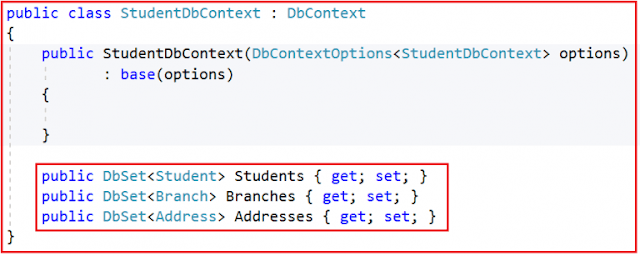
We will use the above DbSet properties such as Students, Branches, and Addresses to perform CRUD Operations.
So, the complete code of the StudentDbContext class is given below.
The DbContext in Entity Framework Core perform the following tasks:
Summary:
I hope this post will be helpful to understand the concept of DbContext in Entity Framework Core
Please share this post with your friends and colleagues.
For any queries please post a comment below.
Happy Coding 😉
- What is a DbContext class?
- How to create and use the DbContext class?
- DbContextOptions class in Entity Framework Core
- Entity Framework Core DbSet
The DBContext class is basically used by our application to interact with the underlying database. That means this class is used to manage the database connection as well as also used to perform CRUD operation with the underlying database.
How to create and use the DbContext class in Entity Framework Core?
In order to use the DbContext class in your application, you need to create a class derives from the DbContext class. The DbContext class present is in Microsoft.EntityFrameworkCore namespace.
So, within the models’ folder create a class file with the name StudentDbContext and then inherit from the class from DbContext class as shown in the below image. You can provide any name for your DbContext class, as I am going to develop an application to manage the students, so I gave the name as StudentDbContext.

DbContextOptions class in Entity Framework Core:
In order to perform any useful task by the DbContext class, we need an instance of the DbContextOptions class. The instance of the DbContextOptions carries all the required configuration information such as the connection string, database provider, etc.
To pass the DbContextOptions instance we need to use the constructor of StudentDbContext class as shown in the image below.

In our next article, we will discuss the DbContextOptions class in detail.
Entity Framework Core DbSet:
The entity framework code DbContext class includes a property i.e. DbSet
namespace FirstCoreMVCApplication.Models
{
    public class Student
    {
        public int Id { get; set; }
        public string Name { get; set; }
        public string Email { get; set; }
        public int BranchId { get; set; }
    }
    public class Branch
    {
        public int Id { get; set; }
        public string Name { get; set; }
    }
    public class Address
    {
        public int Id { get; set; }
        public int StudentId { get; set; }
        public string City { get; set; }
        public string State { get; set; }
        public string Country { get; set; }
        public string Pin { get; set; }
    }
}
As our application contains three entities, so in our StudentDbContext class, we need to have three DbSet Properties as shown below.

We will use the above DbSet properties such as Students, Branches, and Addresses to perform CRUD Operations.
So, the complete code of the StudentDbContext class is given below.
using Microsoft.EntityFrameworkCore;
namespace FirstCoreMVCApplication.Models
{
    public class StudentDbContext : DbContext
    {
        public StudentDbContext(DbContextOptions<studentdbcontext> options)
               : base(options)
        {
        }
        public DbSet<student> Students { get; set; }
        public DbSet<branch> Branches { get; set; }
        public DbSet<address> Addresses { get; set; }
    }
}
So, in Short,The DbContext in Entity Framework Core perform the following tasks:
- Manage database connection
- Configure model & relationship
- Querying database
- Saving data to the database
- Configure change tracking
- Caching
- Transaction management
Summary:
I hope this post will be helpful to understand the concept of DbContext in Entity Framework Core
Please share this post with your friends and colleagues.
For any queries please post a comment below.
Happy Coding 😉

0 comments:
Post a Comment
If you like this website, please share with your friends on Facebook, Twitter, LinkedIn.